Snapshots are a handy feature available to all users in ClicData. They are copies of any dataset at a point in time, that can be created manually when needed or scheduled to be created automatically at a given cadence.
How to create a Snapshot?
Access the Tables & Views explorer in your account, by heading to: Main Menu > Data > Tables & Views
For any dataset which you have editing rights for, you can access the properties on the right (cog icon). Click the dropdown next to the icon and select ‘Snapshot’.

By defining a name and folder to store the snapshot, you create a copy of the selected dataset at the time of the copy. The snapshot won’t change after creation, as it is not dependent from the source dataset.
To automate the creation of a snapshot, head over to Main Menu > Automation > Schedules. Create a schedule and add a Snapshot task.
For further info, please refer to the Help Center.
Use case examples
Let’s see how snapshots can be used for a smart data manipulation process. We will dive into 2 examples, one being more oriented toward data analytics, and the other toward data refresh optimization.
Difference analytics
If you aim to create dashboards showing variances between different versions of a dataset, the snapshot is the perfect tool. Simply set up a schedule with 2 tasks:
- Create a snapshot of your data first
- Refresh the data in a second task
This way you will always keep the latest version of your data as well as the current one. Of course, you can keep more than one version using this method, by renaming the automated snapshot with a dynamic date timestamp, like shown in this screenshot:

Now simply use these 2 datasets in different widgets in your dashboards and calculate the variance dynamically via calculated fields or create a data flow using them and calculating the difference.
Reference on the last data update
On the data management side, snapshots can be used to reduce your data refresh consumption and reduce the data loading time in specific situations.
Let’s assume you work with an API data source that does not allow filtering the data fetched by any time parameter. Hence you end up calling the entire data available on an endpoint with each refresh, like this:
- First call fetches all element IDs: /items
- Second call is parameterized to loop through the ID list and fetch details for each order: /items/{ID}
Each ID from the 2nd call will be counted as 1 data refresh in ClicData. This is costly both in money and time. Also, you might hit quota limits on the third-party API. In reality, you just need to fetch the new orders. Let’s detail how snapshots can help in this scenario.
- Step 1 : Create a first call to fetch all the IDs of the items needed. (/items) This is Dataset1.
- Step 2 : Create a second call with the parameterized ID looping through the ID of Dataset1. (/items/ID) (Read about parameterized API calls) This is Dataset2.
- Step 3 : Create a schedule with a Snapshot task + a Data refresh task for Dataset1 (this is exactly the same setup as described in our first use case).
- Step 4 : Use a Data Flow to create an output table that filters on the IDs present in the latest data refresh and not in the snapshot. (Learn how to use Data flows)
- Step 5 : Change the parameterized call from Step 2 to use the IDs from this output data, and not the full list from step 1.
The final Schedule setup would look like this:
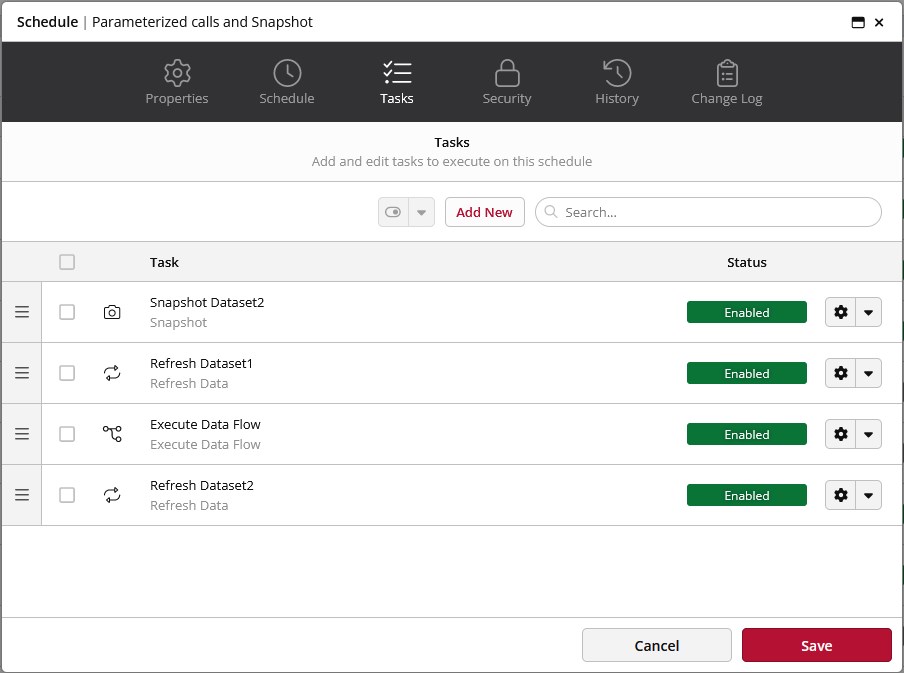
The Data Flow output table is the one to use for the parameterized call of Dataset2.
This data process will ensure that you only fetch new items in your final API call and don’t loose time, money and calls quota on your Dataset2 refresh.
Summary
These are 2 examples of use cases for snapshots. Of course, they can be used for other purposes as well: archiving, building reference datasets, and many more.
Start using them right away and take your data modeling process to the next level!