Let’s talk about our awesome TimeStamp feature.
To understand how it works, first think about our Data History tool. With Data History, every time you upload new data from a data source, ClicData archives the previous version. This can be a lifesaver if you lose data or if it gets corrupted somehow. With Data History, you can easily return to a previous working version and be back in business in no time.
Now imagine using this feature directly within a dashboard! That’s what TimeStamp is all about.
With TimeStamp, you can compare budgetary or performance events as they occur over time with your dashboard that you wouldn’t be able to see using a standard chart. For example, you can line up variables within ‘Before’ and ‘After’ scenarios and compare their outcomes, positions, and more. It’s an extraordinarily useful tool to compare strategies and forecasts with different factors at play.
Here’s how to get TimeStamp working for you in two easy steps:
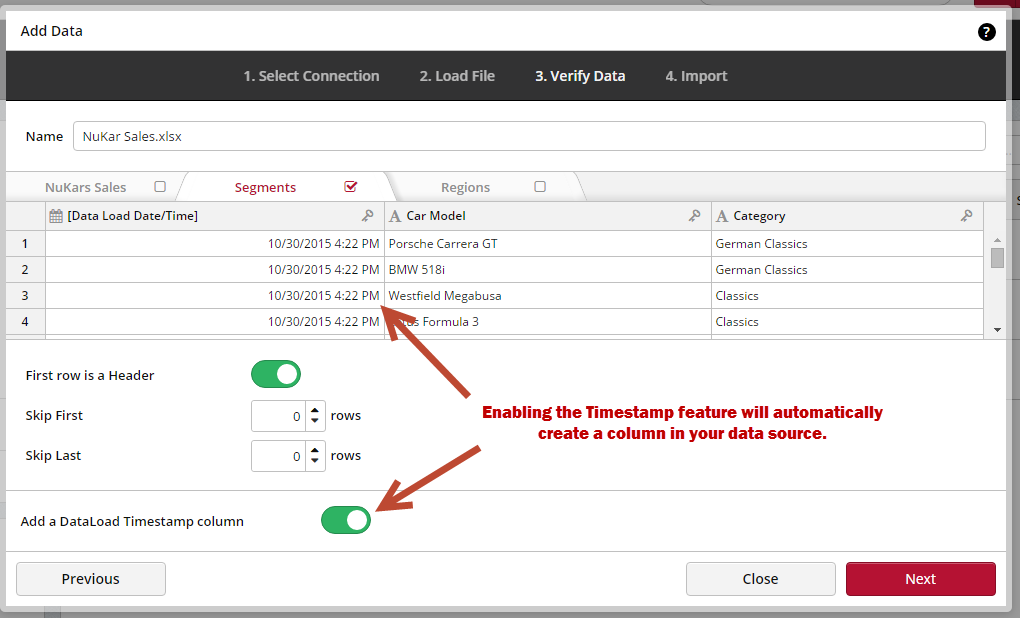
1) First, you’ll enable the TimeStamp feature when you import your data into ClicData. During the third step, when your data is being verified, move the Timestamp switch ON in the bottom left of your screen. Once you do, a new column will automatically be added to your data source.
2) Once TimeStamp is enabled, you can go to the Dashboard Creator, and set a filter to display only the time/date of the data you want.
If you have never set up a filter in ClicData, here is how to do it.
And there you are, if you want further assistance with TimeStamp or any other feature in ClicData, let us know!
Happy Dashboarding!